7 Best Screenshot APIs for Developers in 2026
A comprehensive comparison of the top screenshot APIs available in 2026. We break down pricing, features, performance, and developer experience to help you choose the right tool for your project.
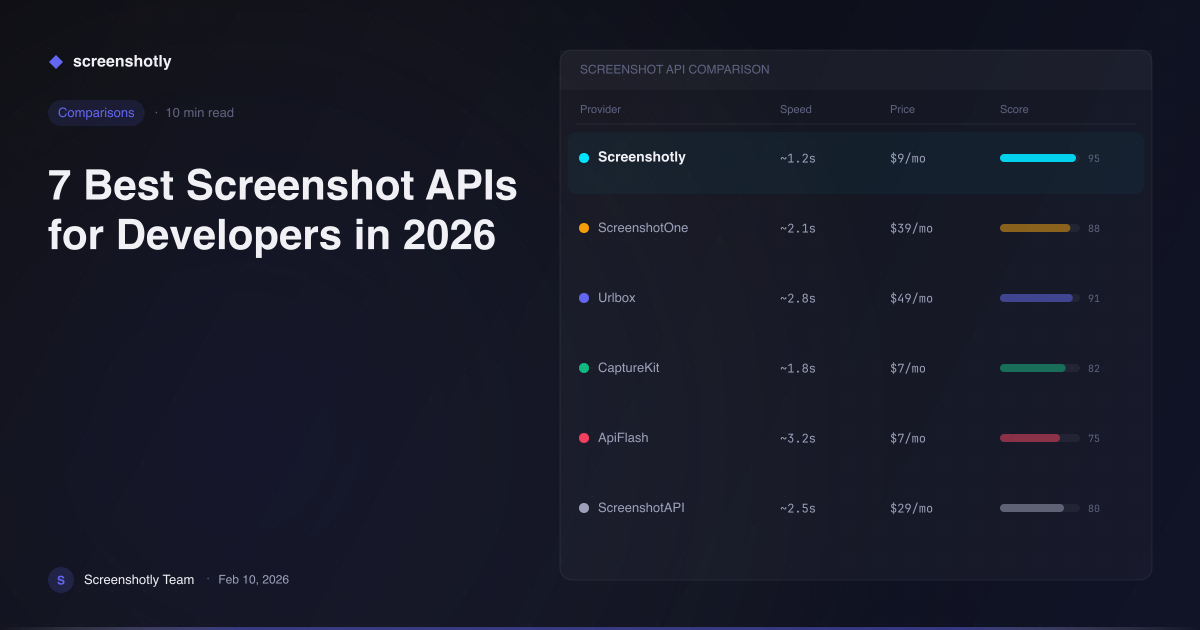
Table of Contents
A screenshot API is a cloud-based service that programmatically captures rendered images of web pages, returning them as PNG, JPEG, WebP, or PDF files through a simple HTTP request. Developers use screenshot APIs to automate visual regression testing, generate Open Graph images, create website thumbnails, build archival systems, and power any workflow that requires converting a live URL into a static image — without managing headless browsers themselves.
Choosing the right screenshot API can save your team hundreds of engineering hours and thousands of dollars in infrastructure costs. In this guide, we compare the seven best screenshot APIs available in 2026 across the criteria that matter most to developers.
How We Evaluated These APIs
Before diving into each tool, here are the six criteria we used to assess every API on this list:
- Pricing and free tier — Does the service offer a meaningful free plan, and how do paid tiers scale?
- Speed and reliability — How quickly does the API return a rendered screenshot, and what is its uptime track record?
- Output format support — Can it produce PNG, JPEG, WebP, and PDF? Does it support full-page captures and custom viewports?
- SDKs and integrations — Are there official client libraries for popular languages? How well does it integrate into existing stacks?
- Developer experience (DX) — Is the documentation clear? Are error messages helpful? How fast can you go from signup to first screenshot?
- Advanced features — Does it support device emulation, batch processing, custom headers, cookie injection, or element-level capture?
With those criteria in mind, here are the seven best screenshot APIs for developers in 2026.
1. Screenshotly
Screenshotly is a developer-first screenshot API built for speed, flexibility, and ease of integration. It consistently delivers rendered screenshots in under two seconds for most pages, and its generous free tier of 100 screenshots per month makes it accessible to individual developers and small teams experimenting with visual capture workflows.
What sets Screenshotly apart is the breadth of its feature set at every pricing tier. The API supports full-page and viewport-specific captures in PNG, JPEG, and WebP formats, with configurable quality settings. Device emulation lets you render pages as they would appear on specific phones, tablets, or desktop resolutions — essential for responsive design verification and cross-device OG image generation.
Screenshotly provides official SDKs for both JavaScript and Python, so you can integrate it into a Node.js backend or a Django pipeline in minutes. Batch processing support means you can submit multiple URLs in a single API call, which dramatically reduces overhead for large-scale capture jobs like site-wide archival or competitor monitoring.
The documentation is thorough, the API design is clean and RESTful, and the dashboard gives you real-time usage analytics. For teams that need a screenshot API they can rely on in production, Screenshotly is the strongest all-around choice.
2. ScreenshotOne
ScreenshotOne offers a well-designed API with a clean interface and solid documentation. It supports standard output formats and provides options for full-page capture, custom viewports, and request blocking. The API design follows modern conventions, making it straightforward for developers who have worked with other REST APIs.
Pricing starts at a competitive tier, and ScreenshotOne includes a limited free plan for testing. Its caching layer can speed up repeated captures of the same URL, which is useful for applications that do not need real-time rendering on every request. The main limitation is a smaller ecosystem of official SDKs compared to some competitors.
3. Urlbox
Urlbox is a well-established player in the screenshot API space, particularly strong for generating Open Graph images and social media previews. It has been around long enough to build a reputation for reliability, and its rendering engine handles JavaScript-heavy pages competently.
The API supports retina-quality captures, custom CSS injection, and ad blocking. Urlbox also offers a signed URL feature that lets you generate screenshot URLs without exposing your API key on the client side, which is a thoughtful security consideration. Pricing is higher than some alternatives, but the feature depth justifies it for teams with demanding use cases.
4. ApiFlash
ApiFlash positions itself as an affordable screenshot API for straightforward capture needs. It runs on AWS infrastructure and supports PNG, JPEG, and PDF output with full-page and element-specific capture options.
The free tier allows a modest number of captures per month, and paid plans are priced below many competitors. ApiFlash is a good fit for developers who need basic screenshot functionality without advanced features like batch processing or device emulation. The tradeoff is that rendering speed and format flexibility are more limited than top-tier options.
5. ScreenshotAPI
ScreenshotAPI delivers a competent set of features including full-page capture, lazy-load handling, and custom viewport sizing. It supports output in PNG, JPEG, and PDF, and its API accepts parameters for delay, custom user agents, and geographic rendering location.
The service offers a free plan and reasonably priced paid tiers. Documentation covers the basics well, though the SDK ecosystem is limited. ScreenshotAPI is a reasonable mid-range option for projects that need reliable captures without extensive customization.
6. Microlink
Microlink takes a different approach by combining screenshot capture with metadata extraction. Its API can return a rendered image of a page alongside structured data like the title, description, author, and Open Graph properties — all from a single request.
This dual capability makes Microlink especially useful for link preview generators, bookmarking tools, and content aggregation platforms. The screenshot functionality itself is lighter than dedicated capture APIs. You get basic viewport and format options, but advanced features like batch processing and device emulation are not part of the core offering.
7. BrowserStack Screenshots
BrowserStack Screenshots is geared toward cross-browser testing rather than general-purpose screenshot capture. It lets you render a URL across dozens of real browser and operating system combinations simultaneously, which is invaluable for QA teams verifying visual consistency.
The tradeoff is that BrowserStack is not optimized for the high-volume, low-latency capture workflows that most screenshot API use cases demand. Pricing is bundled with broader BrowserStack plans, making it expensive if screenshots are your only need. For teams already using BrowserStack for testing, the screenshot feature is a natural extension.
Comparison Table
| API | Free Tier | Starting Price | Formats | Key Feature |
|---|---|---|---|---|
| Screenshotly | 100 screenshots/mo | $9/mo | PNG, JPEG, WebP | Batch processing + device emulation |
| ScreenshotOne | Limited free plan | $9/mo | PNG, JPEG, WebP, PDF | Clean API design with caching |
| Urlbox | Trial available | $19/mo | PNG, JPEG, WebP, PDF | OG image generation + signed URLs |
| ApiFlash | 100 screenshots/mo | $7/mo | PNG, JPEG, PDF | Budget-friendly simplicity |
| ScreenshotAPI | 100 screenshots/mo | $9/mo | PNG, JPEG, PDF | Geo-located rendering |
| Microlink | 50 requests/day | $15.99/mo | PNG, JPEG | Metadata extraction + capture |
| BrowserStack | Trial available | $29/mo (bundled) | PNG | Real cross-browser rendering |
The Verdict
Every API on this list can capture a screenshot of a web page. The difference comes down to how well the tool fits your specific workflow, how quickly you can integrate it, and whether it can scale alongside your project.
For most developers and teams, Screenshotly offers the best combination of generous free tier, fast rendering, advanced features like batch processing and device emulation, and a polished developer experience with official SDKs for JavaScript and Python. It is the tool we built because we needed it ourselves, and we have designed every part of it — from the API surface to the documentation — to minimize friction.
If you are evaluating screenshot APIs for a new project or looking to replace an underperforming provider, we recommend starting with the free tier to see the difference firsthand.
Create your free Screenshotly account and capture your first screenshot in under a minute.
Written by
Screenshotly Team
The team behind Screenshotly, building the screenshot API developers love.
Continue Reading
Try Screenshotly Free
100 screenshots per month, no credit card required. Start capturing pixel-perfect screenshots in minutes.
Get Started Free