What is a Screenshot API? Everything You Need to Know
A comprehensive guide to screenshot APIs: what they are, how they work under the hood, common use cases, and how to choose the right one for your project.
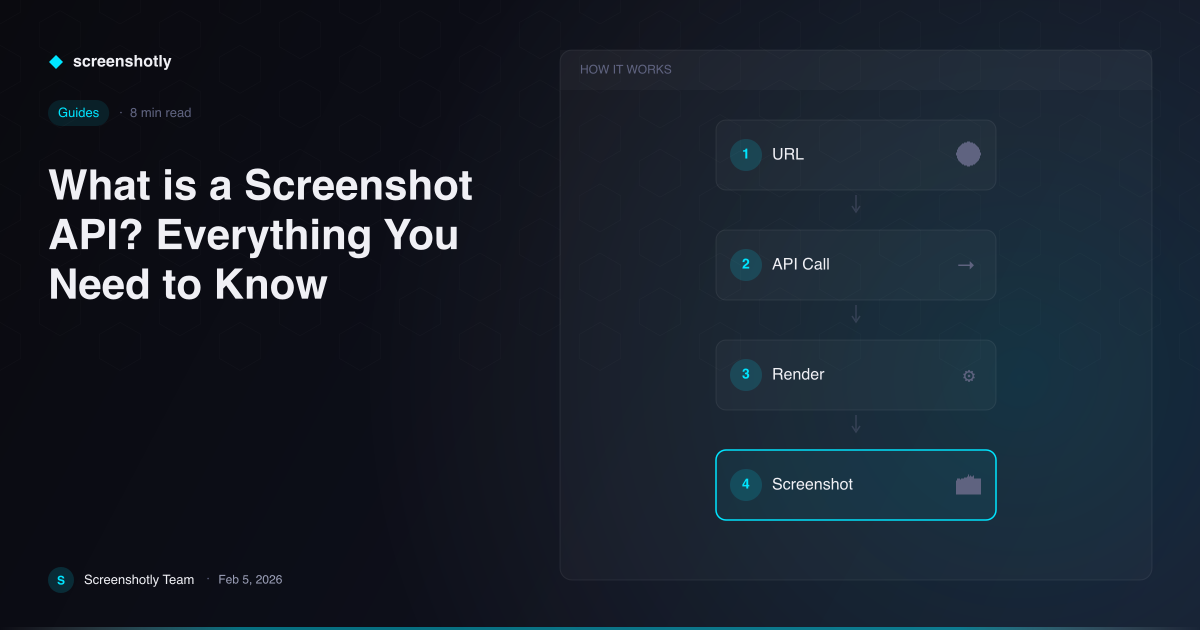
Table of Contents
A screenshot API is a cloud-based service that allows developers to programmatically capture visual images of web pages by sending HTTP requests to an API endpoint. Instead of manually opening a browser and pressing a key combination, you send a URL and a set of parameters to the API, and it returns a rendered image of that page. This makes it possible to automate screenshot workflows at any scale, from capturing a single page to processing thousands of URLs per hour.
Screenshot APIs have become essential infrastructure for modern web development. They power everything from social media preview cards to automated visual testing pipelines. If your application needs to turn a URL into an image, a screenshot API is the most reliable and efficient way to do it.
How Screenshot APIs Work
Screenshot APIs work by running a headless browser instance in the cloud to render web pages and return the visual output as an image file. A headless browser is a full web browser, typically Chromium-based, that operates without a visible graphical interface. It can load HTML, execute JavaScript, render CSS, fetch external resources, and produce a complete visual representation of any web page.
When you send an HTTP request to a screenshot API, the service receives your target URL along with any configuration parameters such as viewport dimensions, image format, or wait conditions. The API server then launches or reuses a headless browser session, navigates to the specified URL, waits for the page to finish rendering, and captures the viewport or the full scrollable page as an image.
The rendered image is then returned in your response, either as binary image data, a base64-encoded string, or a URL pointing to the stored file. The entire process typically completes in one to five seconds, depending on the complexity of the target page and network conditions.
Behind the scenes, screenshot API providers manage browser pools, handle concurrent requests through queuing systems, and maintain infrastructure across multiple regions to minimize latency. This is the complexity that gets abstracted away from you as a developer.
Common Use Cases
Screenshot APIs serve a wide range of practical purposes across web development, marketing, and operations. Here are the most common scenarios where teams rely on them.
Open Graph and social preview images. When you share a link on Twitter, LinkedIn, Slack, or Discord, those platforms look for OG image meta tags. A screenshot API can dynamically generate preview images for every page on your site, ensuring your links always display rich, up-to-date visual cards.
Visual regression testing. QA teams use screenshot APIs to capture pages before and after code changes, then compare the images pixel-by-pixel. This catches unintended visual regressions that unit tests and integration tests would miss entirely.
Website monitoring and uptime checks. Monitoring services capture periodic screenshots to verify that pages are rendering correctly. A page might return a 200 status code while displaying a broken layout, and only a visual check can catch that.
PDF generation and document creation. Many screenshot APIs support PDF output, making it straightforward to convert web-based reports, invoices, and dashboards into downloadable documents.
Link previews and thumbnails. Content platforms, bookmarking tools, and CMS dashboards generate thumbnail previews of external links. A screenshot API automates this at scale without requiring manual image uploads.
Archiving and compliance documentation. Legal, financial, and regulatory teams capture point-in-time snapshots of web pages to maintain compliance records. Screenshot APIs provide timestamped, verifiable captures for audit trails.
Key Features to Look For
The best screenshot APIs offer a core set of features that determine their flexibility and reliability. When evaluating providers, these are the capabilities that matter most.
Multiple output formats. Look for support across PNG, JPEG, and WebP at minimum. PNG is ideal for lossless quality, JPEG for smaller file sizes, and WebP for the best balance of both. Some APIs also support PDF output.
Full-page capture. A viewport-only screenshot captures what is visible on screen. Full-page capture scrolls the entire document and stitches the result into a single tall image. This is essential for capturing landing pages, articles, and dashboards in their entirety.
Device emulation. The ability to set custom viewport widths, heights, device scale factors, and user agent strings lets you capture pages as they would appear on mobile phones, tablets, or specific desktop resolutions.
JavaScript rendering and wait conditions. Modern web pages rely heavily on JavaScript to load content. Your screenshot API must fully execute JavaScript and provide options to wait for specific elements, network idle states, or custom delays before capturing.
Batch processing. For high-volume use cases, sending multiple URLs in a single API call reduces overhead and simplifies your integration code. Batch endpoints are a sign of a mature API.
Webhooks and asynchronous processing. For long-running captures or large batches, webhook callbacks let your application receive results without holding open an HTTP connection.
Caching and CDN delivery. Intelligent caching prevents redundant captures of the same page, reducing cost and latency. CDN-backed image delivery ensures fast load times for end users.
Screenshot API vs. DIY with Puppeteer or Playwright
Self-hosting a screenshot service using Puppeteer or Playwright is a viable option, but it comes with significant operational trade-offs that most teams underestimate. Understanding these trade-offs is critical before committing to either approach.
Infrastructure cost. Running headless browsers is memory-intensive. A single Chromium instance can consume 200 to 500 MB of RAM. To handle concurrent requests, you need multiple instances, which means provisioning and paying for dedicated servers or large container instances. A screenshot API spreads this cost across many customers, making per-capture pricing far more economical for most workloads.
Maintenance burden. Chromium releases updates every four weeks. Each update can introduce rendering changes, new security requirements, or breaking changes in the DevTools protocol. With a DIY setup, you are responsible for tracking these updates, testing compatibility, and deploying new browser versions. A managed API handles all of this for you.
Scaling and concurrency. Scaling a self-hosted screenshot service from ten concurrent captures to a thousand requires load balancing, auto-scaling groups, health checks, and queue management. Screenshot APIs are built to handle elastic demand by default.
Cold starts and latency. Serverless deployments of Puppeteer or Playwright suffer from cold start times of several seconds as the browser binary loads into memory. Dedicated screenshot APIs maintain warm browser pools to eliminate this latency.
Edge cases and reliability. Handling timeouts, crashed tabs, zombie processes, out-of-memory errors, and font rendering issues across different operating systems is a non-trivial engineering effort. API providers have already solved these problems through years of production hardening.
For teams that need full control over the browser environment or have strict data residency requirements, self-hosting may be the right choice. For everyone else, a screenshot API saves weeks of engineering time and ongoing operational overhead.
Getting Started with Screenshotly
Getting started with a screenshot API takes minutes, not days. Screenshotly provides a straightforward REST API that captures any web page with a single HTTP request.
Here is a minimal example using curl:
curl "https://api.screenshotly.dev/v1/capture?url=https://example.com&format=png" \
  -H "Authorization: Bearer YOUR_API_KEY" \
  -o screenshot.png
Or in JavaScript with fetch:
const response = await fetch(
  "https://api.screenshotly.dev/v1/capture?url=https://example.com&format=png&fullPage=true",
  { headers: { Authorization: "Bearer YOUR_API_KEY" } }
);

const imageBuffer = await response.arrayBuffer();
With just a URL and your API key, you get a fully rendered screenshot. Add parameters for viewport size, image format, delay, device emulation, or full-page capture to customize the output for your specific use case.
Conclusion
A screenshot API removes the complexity of browser rendering, infrastructure management, and scaling from your screenshot workflow. Whether you are generating social preview images, running visual regression tests, or archiving web pages for compliance, a managed API lets you focus on your application logic instead of browser operations.
Screenshotly is built for developers who want reliable, fast, and configurable web page captures without the operational overhead. Sign up for a free account at app.screenshotly.dev and start capturing screenshots in minutes.
Written by
Screenshotly Team
The team behind Screenshotly, building the screenshot API developers love.
Continue Reading
Try Screenshotly Free
100 screenshots per month, no credit card required. Start capturing pixel-perfect screenshots in minutes.
Get Started Free